Typography is one of the most impactful elements of your landing page design. EcomWize gives you full control over fonts, sizes, weights, and text formatting for both desktop and mobile screens. All typography settings are configured within the Typography tab of the Brand Style modal.
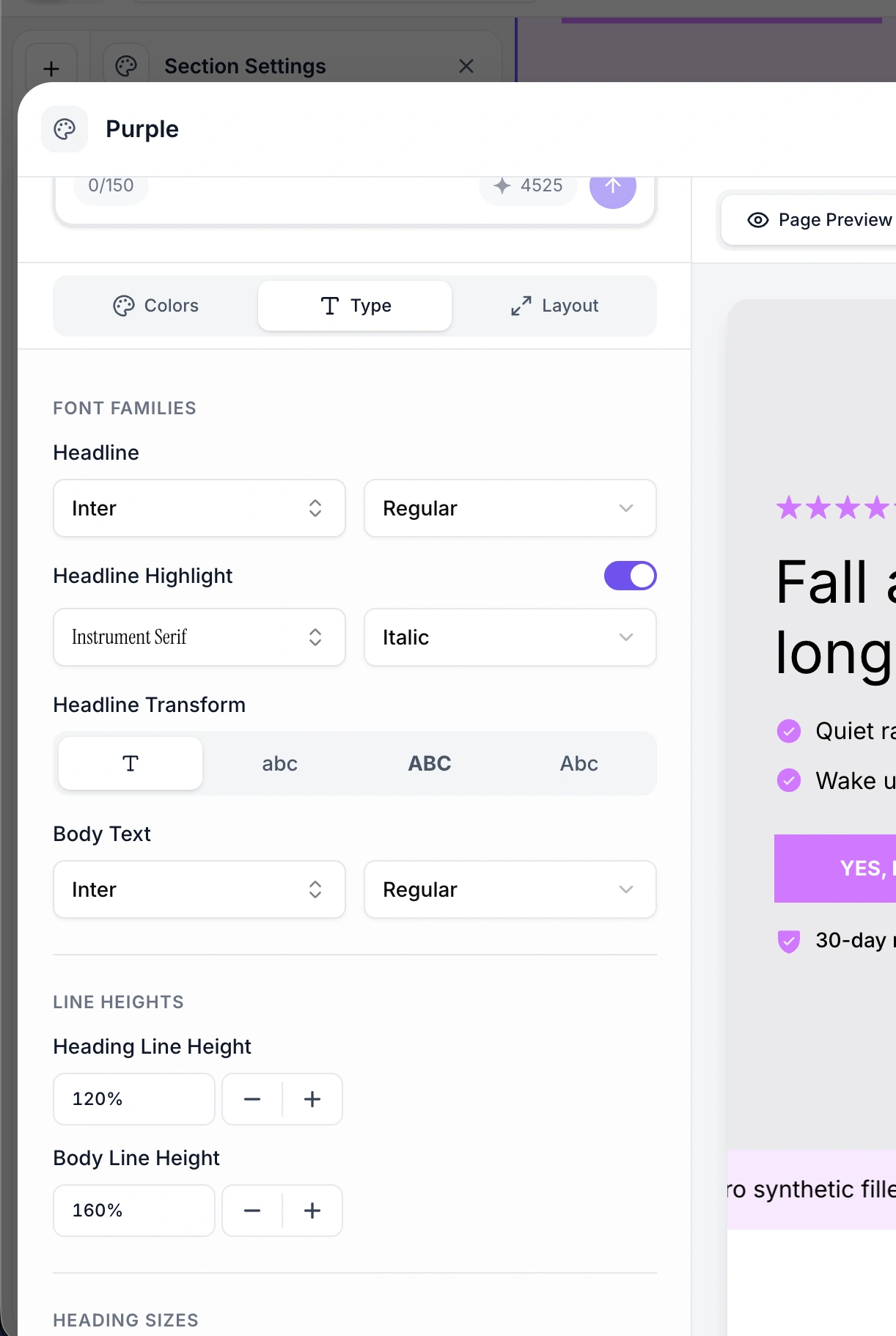
Your brand style uses up to three font families, each serving a different purpose:
The heading font is used for all headings (H1 through H6) across your landing page sections. This is typically the most distinctive font in your design - it sets the visual tone for your brand.
Choose from 1,500+ Google Fonts or upload a custom font
Example: Poppins, sans-serif
The body font is used for paragraphs, descriptions, labels, and all non-heading text. It should be highly readable at smaller sizes.
Choose from Google Fonts or upload a custom font
Can be the same as or different from the heading font
Example: Poppins, sans-serif
The highlight font is a special font used for emphasized text - words or phrases that you wrap in highlight formatting within your sections. It is often a decorative or contrasting font (like a serif or script) that draws attention to key phrases.
Only active when text highlighting is enabled in your brand style
Typically a serif or handwriting font to contrast with sans-serif heading/body fonts
Example: Instrument Serif, serif

Font weights control how thick or thin your text appears. Different weights are configured for different text types:
Property | Description | Example |
Heading weight | Weight for all headings (H1-H6) | 600 (Semi-Bold) |
Body weight | Weight for paragraphs and body text | Regular (400) |
Button weight | Weight for button text | 600 (Semi-Bold) |
Highlight weight | Weight for highlighted text | Regular |
Available weight values depend on the selected font. Common weights include:
100 - Thin
200 - Extra Light
300 - Light
400 - Regular
500 - Medium
600 - Semi-Bold
700 - Bold
800 - Extra Bold
900 - Black

Some weights also support an italic variant (e.g., "600italic" for semi-bold italic). This is particularly useful for highlight fonts where italic styling adds emphasis.
EcomWize lets you set font sizes separately for desktop and mobile screens. This ensures your text is optimally sized for every device.
Each heading level has independent desktop and mobile sizes:
Level | Desktop Example | Mobile Example | Typical Use |
H1 | 40px | 32px | Main page headline, hero heading |
H2 | 32px | 28px | Section headings |
H3 | 28px | 24px | Sub-section headings |
H4 | 22px | 20px | Card headings, feature titles |
H5 | 20px | 18px | Small headings, labels |
H6 | 18px | 16px | Smallest headings, captions |
Three paragraph size tiers are available for different text contexts:
Level | Desktop Example | Mobile Example | Typical Use |
P1 | 16px | 14px | Primary body text, descriptions |
P2 | 14px | 12px | Secondary text, captions, metadata |
P3 | 12px | 10px | Fine print, disclaimers, footnotes |
Buttons have their own font size setting, independent of paragraph sizes:
Desktop Example | Mobile Example | |
Button text | 16px | 14px |
Text transform controls the capitalization of text. Two text transform settings are available:
Applies to all headings (H1-H6) across your page:
Option | Effect | Example |
None | Text appears as typed | "Welcome to Our Store" |
Uppercase | All letters capitalized | "WELCOME TO OUR STORE" |
Lowercase | All letters lowercased | "welcome to our store" |
Capitalize | First letter of each word capitalized | "Welcome To Our Store" |
Applies to all button labels:
Option | Effect | Example |
None | Text appears as typed | "Add to Cart" |
Uppercase | All letters capitalized | "ADD TO CART" |
Lowercase | All letters lowercased | "add to cart" |
Capitalize | First letter of each word capitalized | "Add To Cart" |
Default for both: None
Line height controls the vertical spacing between lines of text. Two line height properties are available:
Property | Example | Description |
Heading line height | 120% | Tighter spacing for headings, keeping multi-line headings compact |
Body line height | 160% | More generous spacing for body text, improving readability |
Line heights are expressed as percentages relative to the font size. A 120% line height on a 40px heading means 48px of vertical space per line. A 160% line height on a 16px paragraph means 25.6px per line.
Here is a summary of all typography properties in the Brand Style:
Property | Where It Applies | Example Value |
Heading font | H1-H6 headings | Poppins, sans-serif |
Body font | Paragraphs, labels, descriptions | Poppins, sans-serif |
Highlight font | Highlighted/emphasized text spans | Instrument Serif, serif |
Heading weight | All headings | 600 |
Body weight | All body text | Regular |
Button weight | Button labels | 600 |
Highlight weight | Highlighted text | Regular |
H1 size | Desktop / Mobile | 40px / 32px |
H2 size | Desktop / Mobile | 32px / 28px |
H3 size | Desktop / Mobile | 28px / 24px |
H4 size | Desktop / Mobile | 22px / 20px |
H5 size | Desktop / Mobile | 20px / 18px |
H6 size | Desktop / Mobile | 18px / 16px |
P1 size | Desktop / Mobile | 16px / 14px |
P2 size | Desktop / Mobile | 14px / 12px |
P3 size | Desktop / Mobile | 12px / 10px |
Button size | Desktop / Mobile | 16px / 14px |
Heading transform | H1-H6 capitalization | None |
Button transform | Button capitalization | None |
Heading line height | Vertical spacing for headings | 120% |
Body line height | Vertical spacing for body text | 160% |